Security Awareness Training

User Guides

User Guides

woman on laptop
What is Cyber Security? 

Cyber security involves using various methods and tools to protect your computer systems, networks, and devices from cyber threats like hacking, malware, and phishing. Its goal is to prevent unauthorised access, theft, alteration, or destruction of sensitive data. In today’s digital world, safeguarding everyday devices against cyber-attacks is essential to keeping your business safe.

What is Security Awareness Training?
Help strengthen your human firewall and safeguard your organisation with BT Security Awareness Training. Help defend your organisation against cyber criminals with engaging, automated training. Run realistic phishing simulations, grow your cyber defence skills.

Simple management platform
User-friendly web-based platform.
Automated, realistic phishing simulations
Ready-made templates that mimic real world attacks.
Detailed reporting dashboard
Monitor your improving cyber awareness culture.
Simple management platform
User-friendly web-based platform.
Automated, realistic phishing simulations
Ready-made templates that mimic real world attacks.
Detailed reporting dashboard
Monitor your improving cyber awareness culture.

Welcome to your cyber security learning journey!

You've taken the first step towards learning about cyber security, and how to protect yourself and your organisation against cyberattacks. We want your learning experience to be smooth and engaging, you now have access to an easy-to-use platform where you will go on a journey as a user or administrator.  Use the information below as a simple guide to:

  • Create an account
  • Navigate the platform
  • Access helpful tips
  • Get support when needed


Guides

You have been assigned a course to help you better protect your organisation against cyber security threats. When you click ‘Take course’, you will be prompted to create a password. 


PICTURE PLACEHOLDER


  • You will receive an email on the day your organisation sends your first course with instructions to click to complete the course. Keep an eye on your inbox.
  • You only need to create a password once, at the start of your first course.
  • You will have full access to the Security Awareness Training platform and can set up single sign-on for future logins.
  • Use the link sent to you to access the platform in the future. We recommend bookmarking this link in your browser for easy access.
 

service handbook screenshot

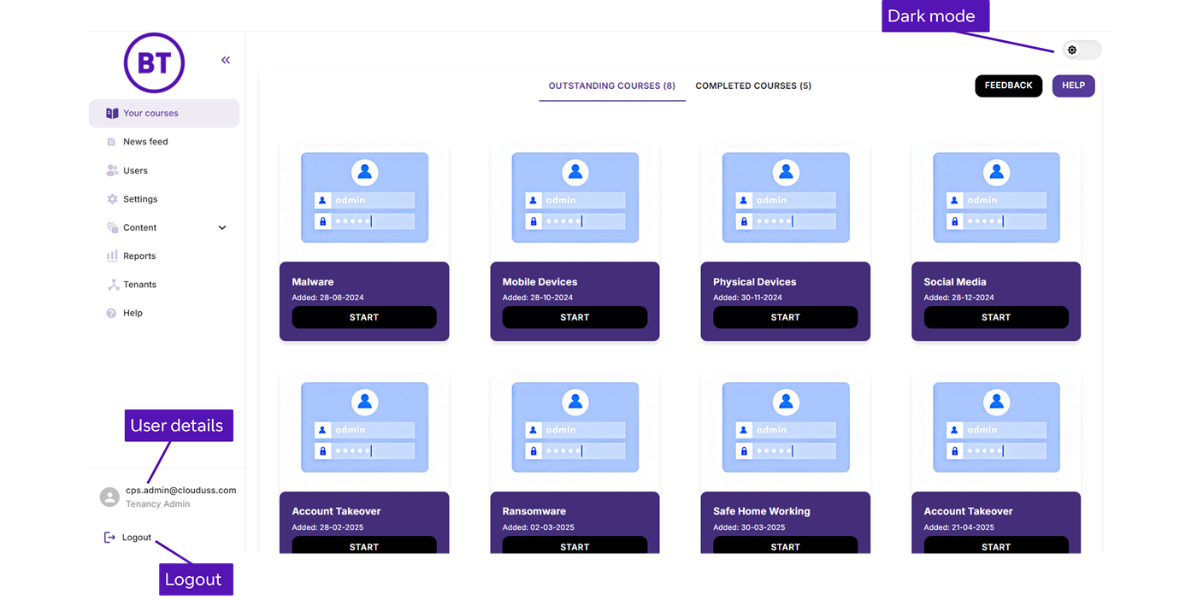
The homepage focuses on your courses for simplicity and efficiency. You can see your outstanding and completed courses here. Other options include:


  • Your Courses: View and manage your outstanding and completed courses.
  • User Profile: Access and update your personal information.
  • Accessibility: Switch the interface between light and dark mode (top right corner).
  • Logout: Securely log out of your account.
  • Feedback: Send feedback directly to the product team to help improve your experience.

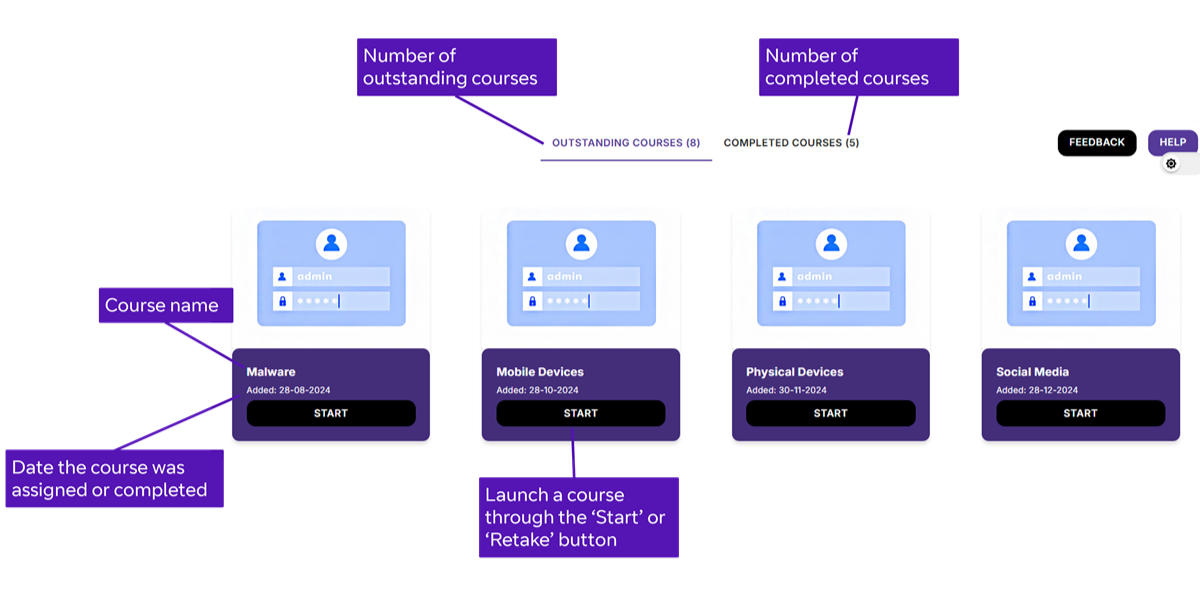
Click on a course displayed in boxes with the course name.

pic
service handbook screenshot

1.     Click start to begin your course

2.     Watch the video and listen to audio, which can be paused and resumed to suit your learning style. You can also switch on closed captions.

3.     Complete the quiz following the video to test your knowledge. You need a pass rate of 80% or higher. If you score below this, you can retake the quiz.

4.     Once you pass, the course will be marked as completed and moved to your completed courses list.

5.     You can then return to the homepage to start another course or come back later. Remember to bookmark the platform for easy access.


service handbook screenshot