Find out how to get set up with your new broadband. The steps you’ll need to take depend on if:
An engineer is going to install your broadband
You’re setting the broadband up yourself
An engineer is going to install my broadband
If an engineer is going to install your broadband, there are a few things you’ll need to do before your installation day. Things like:
- Getting permission from the property owner for possible engineering work.
- Making sure you have a power socket near to where you want us to install your broadband equipment.
- Providing us with your site contact details – this is the person who will let the engineer in on your installation day and answer any questions they may have. You can update these details in our Order Tracker online.
You can skip the rest of this guide – your engineer will handle the setup. What happens on the day depends on the broadband you've ordered, and your order confirmation will tell you which one you're getting:
- Standard broadband? Head to our broadband engineer installation guide to see what to expect.
- Full Fibre (FTTP)? Our fibre installation guide covers what happens before and on the day.
I’m setting the broadband up myself
Got your equipment already? You can find the right setup guide for your broadband below.
I also purchased Hybrid Connect
If you also purchased Hybrid Connect (backup 4G from EE), this means you can get online before your broadband’s been activated.
View our Hybrid Connect setup guide and follow the steps.
I just need to set up my Smart Hub
If you’re setting up the broadband yourself and did not purchase Hybrid Connect, you’ll just need to set up the Smart Hub we sent you.
We recommend setting it up on your broadband activation date.
Find your Smart Hub model below, select the relevant guide and follow the steps to get set up.
BT Business Smart Hub 3 |
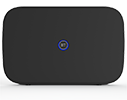 |
BT Business Smart Hub 2 |
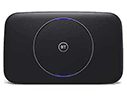 |
BT Business Smart Hub |
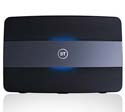 |
Other Hubs
For help setting up any of our older broadband hubs, check out our full list of hub models.
If you also purchased Complete Wi-Fi disks
If you also purchased Complete Wi-Fi disks, you’ll need to set them up after your broadband’s been activated and you’ve set up your Smart Hub. Find out how in our Complete Wi-Fi disks setup guide.