Find out how to get set up with your new broadband. The steps you’ll need to take depend on if:
An engineer is going to install your broadband
You’re setting the broadband up yourself
An engineer is going to install my broadband
If an engineer is going to install your broadband, there’s a few things you’ll need to do before your installation day. Things like:
- Getting permission from the property owner for possible engineering work.
- Making sure you have a power socket near to where you want us to install your broadband equipment.
- Providing us with your site contact details – this is the person who will let the engineer in on your installation day and answer any questions they may have. You can update these details in our Order Tracker online.
The rest of this guide doesn’t apply to you – instead, check out our broadband engineer installation guide to learn more about what to expect on your installation day.
Note: we’ll let you know at the time of purchase if you require an engineer to install your broadband – not every customer requires this.
I’m setting the broadband up myself
Got your equipment and ready to go? Find out how to get your broadband set up yourself.
I also purchased Hybrid Connect
If you also purchased Hybrid Connect (backup 4G from EE), this means you can get online before your broadband’s been activated.
View our Hybrid Connect setup guide and follow the steps.
I just need to set up my Smart Hub
If you’re setting up the broadband yourself and did not purchase Hybrid Connect, you’ll just need to set up the Smart Hub we sent you.
We recommend setting it up on your broadband activation date.
Find your Smart Hub model below, select the relevant guide and follow the steps to get set up.
BT Business Smart Hub 3 | 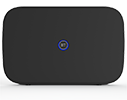 |
BT Business Smart Hub 2 | 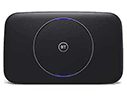 |
BT Business Smart Hub | 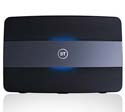 |
Other Hubs
For help setting up any of our older broadband hubs, check out our full list of hub models.
If you also purchased Complete Wi-Fi disks
If you also purchased Complete Wi-Fi disks, you’ll need to set them up after your broadband’s been activated and you’ve set up your Smart Hub. Find out how in our Complete Wi-Fi disks setup guide.